One of the freakiest things about running on an excellent MacBook Pro is the keyboard layout. Keys in the wrong place and a few missing ones like #, PrtScr and AltGr. Once you get used to it it's all good however. There's combinations and so forth to get at things you need. The trouble is just as you've gotten used to it, you fire up those development virtual machines and they don't know squat about the Apple keyboard. This is because the custom Input mapping installed as part of the Boot Camp package isn't installed on the VM. Arse!
Many people think that installing the Apple Keyboard Driver might fix this issue, it doesn't - that driver is for a USB or Bluetooth external Apple Keyboard, which a VM won't know about (even in VMWare). The bits needed are actually in the Boot Camp MSI, and it's reasonably straightforward to figure out how to extract just the bits needed and hack up an installer, but that's way more work than needed. Plus, you don't want to install that crap on your VM, all you need is an alternate keyboard layout.
There's a much easier way, using the Microsoft Keyboard Layout Creator.
In a nutshell, you install the MSKLC on your host and then open up the Apple Keyboard which is already on your host. Then you can create an installer for it from MSKLC. Copy that guy to your VM and run it. You then have a Apple layout available:
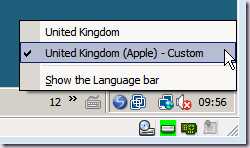
Now your keys are in the same place regardless of whether you are working in a VM or on your Host. Kickin'.
I've created an installer for my VMs, which you can download here. Of course, mine is a UK layout. To create your own layout for your preferred language simply follow the instructions above.
You know the score - you've a couple of indispensable applications which refuse to install on your operating system of choice because the idjut vendor decided it would be a good idea to bake into the installer some sort of version check. This is usually when you're trying to use a 64 bit operating system or wish to install something on a server OS. I have a couple examples - Sony's Ereader is a must have for me, but the installer doesn't like 64 bit. Others include Live Messenger and LifeCam which refuse to install on Windows Server.
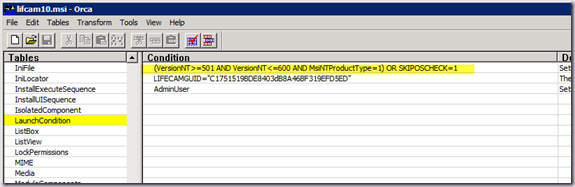
It turns out that if the installer is an MSI you are in luck - the Microsoft Platform SDK includes a program called Orca which allows you to edit the MSI to remove the offending entries, usually in the Launch Condition table which look something like this: